AI Orchestration Before and After Launch: The Founder's Loop (2026)
How to run one AI loop across the whole life of a product: survey answers before launch, MCP and the API for live reads, drafted campaigns on launch day, onboarding data after.
Posted by
 Rouzbeh
Related reading
Giving a Support Chatbot Tools, Not Just Documents
A bot that answers from your docs is a weekend. A bot that can read and change a customer's own account is a different problem, and almost none of it is the AI part.
Answering Support When You Are the Whole Company
Support is the highest-quality research channel a small product has, and the fastest way to burn out if you treat it as an obligation. How to answer, what to automate, and how to say no.
The Pricing Page: What to Put On It, and What to Leave Off
Picking the number is one problem, presenting it is another. Plan names, the free tier decision, trials and card-up-front, annual billing, and the things founders add that quietly cost them customers.
Most founders use AI the same way twice a week: open a chat, paste something in, get a paragraph back, close the tab. That is a tool, not a system. Nothing accumulates, and the model never sees the one dataset that would make it useful, which is what your own future customers have told you.
Orchestration is the version where the steps are connected. The model reads live data instead of a paste, the output feeds a decision you actually make, and the result of that decision writes new rows that the next run reads. It is a loop, and the loop does not stop at launch. It only changes what it is reading.
This post is the whole arc: what to capture before launch so a model has something worth reading, how to wire it up with MCP and an API key, what to run in launch week, and how the same loop keeps working once real users are inside your app. I run this on Lighthouse itself, so the examples are the ones I actually use.
Table of contents
- What AI orchestration means for a one-person company
- The loop, in five steps
- Before anything else: capture answers worth reading
- Wiring the model to live data with MCP
- The pre-launch loop, one hour a week
- Launch week: orchestrating the send
- After launch: same loop, different rows
- Who does what in the stack
- Where orchestration breaks
- The 30-minute setup
- Frequently asked questions
What AI orchestration means for a one-person company
In enterprise writing, orchestration usually means a graph of agents handing tasks to each other. Ignore that. At indie scale it means something smaller and much more useful: the model has standing access to your real data, and its output lands in a place where it changes what you ship.
Three things separate an orchestrated setup from a chat window.
- Live access instead of paste. The model reads the row written thirty seconds ago, not the CSV you exported last Tuesday. This is the part MCP solves.
- Structure instead of prose. You ask for themes, segments, and quotes that map back to real answers, so the output can be checked rather than admired.
- A closed loop. What you do with the output (an email sent, a question added, a feature shipped) produces new data that the next run reads.
What it does not mean is autonomy. Nothing in the loop below sends an email or changes a product on its own, and the section on where this breaks explains why that limit is the point rather than a gap.
The loop, in five steps
Every useful thing in this post is one turn of the same wheel. Capture answers, let a model read them, get structure back, draft the response, then decide what actually ships.
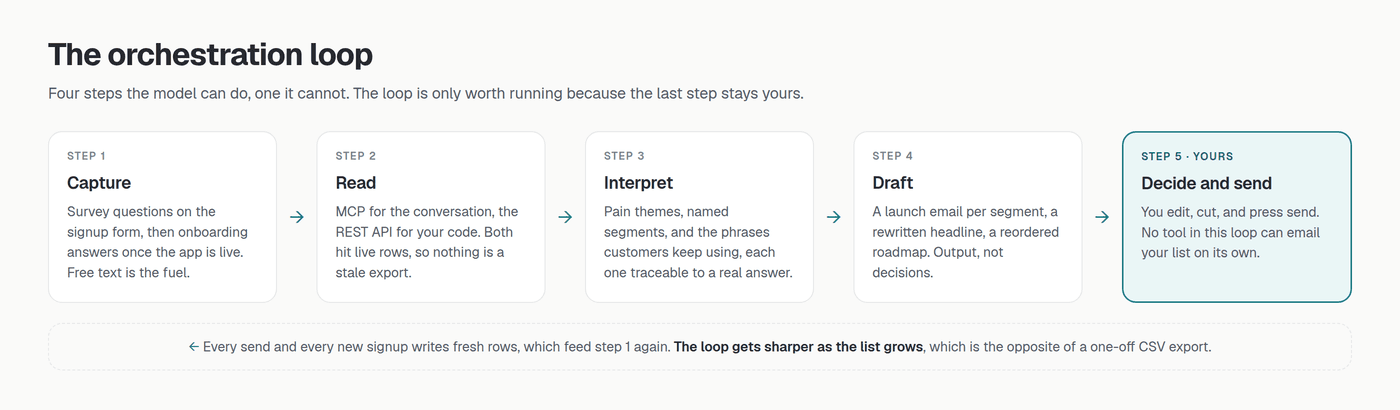
The fifth step is the one people try to remove, and it is the one holding the other four up. A model that can read your waitlist is a research assistant. A model that can email your waitlist is a liability with a send button.
Before anything else: capture answers worth reading
An orchestrated setup on top of an email-only waitlist produces nothing. A thousand addresses and no answers gives a model exactly one fact to work with, which is that a thousand people clicked a button. Everything downstream depends on what you asked at signup.
Three questions on the signup form are enough, and free text matters more than multiple choice because it is the only place a customer can surprise you.
- What do you use for this today? Gives you a real competitor list in your customers' words, and it segments cleanly because the answers cluster.
- What is the most annoying part of doing it that way? This is the free-text one. It is where pain themes and your future landing page copy come from.
- Who are you? (role or company size) One multiple choice question that turns every later answer into something you can slice.
Two failure modes to avoid at this stage. Leading questions (“how much would this save you?”) produce answers that confirm what you already believe, and a model will faithfully summarise your own assumption back to you. And long forms cut completion hard, so three questions answered beats eight abandoned. The product survey guide goes deeper on question design.
Wiring the model to live data with MCP
MCP (Model Context Protocol) is the open standard that lets an AI client talk to an outside system. Think of it as a USB port: the AI app has the socket, a service provides the plug, and neither side needs custom glue. It replaces both bad options, the stale CSV paste and the custom integration you do not have time to build. If it is new to you, start with what MCP is in plain English.
Lighthouse ships an MCP server, so connecting a waitlist is config rather than code. Generate an API key under Settings → API keys, then add one block to your client and restart it. Claude Desktop, Cursor, and ChatGPT all take the same two fields.
{
  "mcpServers": {
    "lighthouse": {
      "url": "https://lighthouse.build/api/mcp",
      "headers": {
        "Authorization": "Bearer lh_..."
      }
    }
  }
}
The server exposes five tools, all read-only: list_waitlists for every list with its signup count, get_waitlist for one list plus the survey questions attached to it, list_signups for the answers themselves with pagination, and two semantic search tools, search_signups and search_feedback, for finding the answers closest in meaning to a question when the list is too long to read in full. The model picks which to call and in what order. Ask about themes and it will typically walk all three without being told to, which is the orchestration part you do not have to write. The MCP walkthrough has the full setup with screenshots.
One detail worth knowing before you connect anything: the reason get_waitlist exists at all is that raw answers are meaningless without the questions. An answer of “about 40 a week” means nothing until the model knows the question was about hours lost, not dollars spent. Any orchestration setup that feeds a model bare values with no schema will produce confident nonsense.
The pre-launch loop, one hour a week
Once the wiring exists, the pre-launch loop is a weekly habit rather than a project. Mine takes under an hour and produces three things: a decision about the product, a change to the landing page, and the next question worth asking.
1. Read the week, not the total
“Compare signups from the last 7 days against the 7 before. What changed in what people are asking for?” Totals only ever go up and tell you nothing. The delta tells you whether the traffic from that launch post was a different audience, which is the difference between growth and noise.
2. Pull themes with the receipts
“What are the three most common pain points across all answers? Quote one real answer for each and say how many people said something similar.” Insist on the quotes. They are how you check the model did not invent a pattern, and they double as landing page copy you did not have to write. If you would rather not run this by hand, the dashboard has one-click AI insights that return the same shape: pain themes with example quotes, named audience segments with size estimates, and the phrases customers keep reusing.
3. Turn themes into segments
“Group signups by what they said they use today, then tell me which group sounds most urgent and why.” This is the raw material for launch day, and it is the step where a model beats a spreadsheet outright, because the grouping lives in prose rather than in a column. The segmentation playbook covers which segments are worth separate emails.
4. Close the loop
The output has to change something or the week was entertainment. In practice it is one of three moves: rewrite the headline using a phrase real people used, add or replace a survey question because a theme keeps arriving as a vague note, or reorder what you are building next. Each of those changes what next week's signups say, which is the loop closing.
Launch week: orchestrating the send
Launch is where the pre-launch work either pays off or sits unused. The mistake is one generic announcement to everyone. The orchestrated version is four steps, and only the last one is irreversible.
- Ask for the segments. Run the grouping prompt again on the final list. Three segments is usually right. Five is over-segmenting, and you will feel it when you try to write five distinct emails that are not just synonyms of each other.
- Draft one email per segment. “Draft a launch email for the people who said price was their main concern, using their own words for the problem.” The model has read the answers, so the first paragraph can name the pain instead of naming your product.
- Edit hard. Cut the model's adjectives, keep its structure. The reliable pattern is that a model is good at knowing what a segment cares about and mediocre at sounding like you. The subject line is worth rewriting by hand every time.
- Send it yourself. Compose the campaign in the dashboard, aim it at the list, press send. Deliberately a human action, and the launch email guide covers what belongs in it.
One honest limitation. Campaigns target a whole list, so sending three different emails to three segments means either three lists or three sends with your own filtering. That is real friction, and it is the reason over-segmenting hurts: each extra segment is another list to maintain for a gain that shrinks fast after the third one.
After launch: same loop, different rows
Most founders stop here. The waitlist did its job, the launch email went out, and the AI setup quietly becomes unused. That is the wrong moment to drop it, because the data gets dramatically better the day real users show up. Pre-launch answers come from strangers guessing. Post-launch answers come from people who have used the thing.
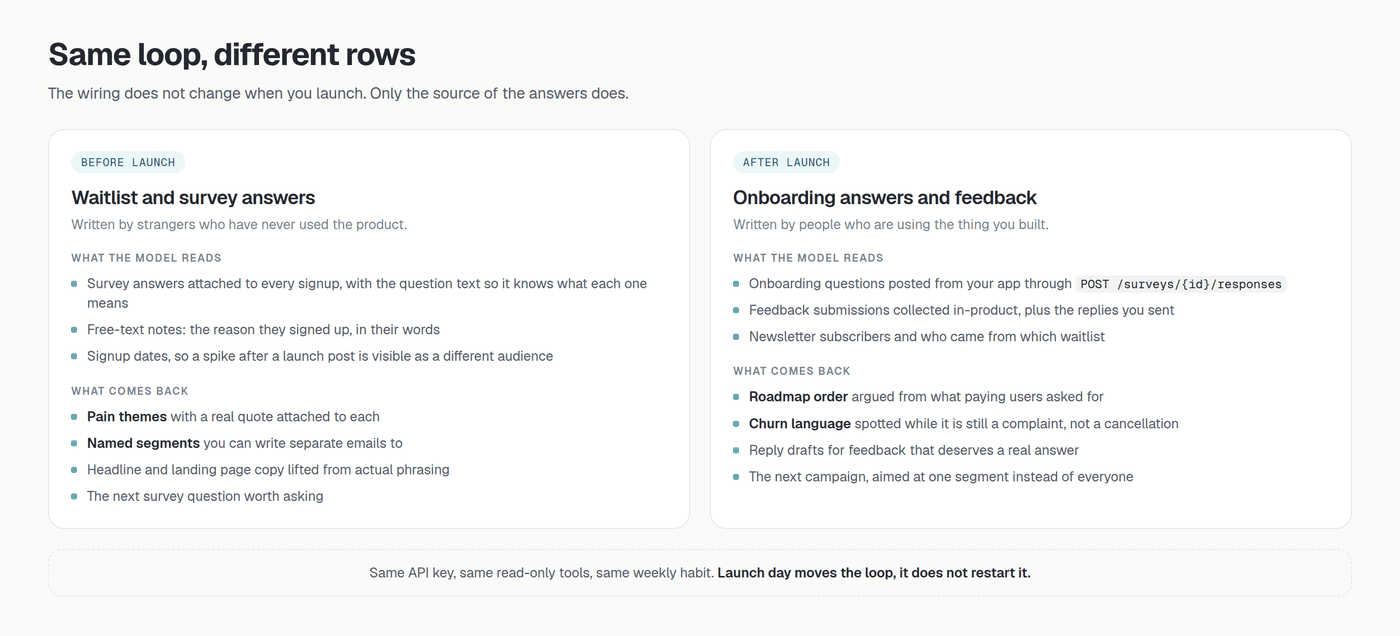
The mechanism that keeps the loop alive after launch is the REST API, which uses the same lh_ key as MCP. Your app posts data in, the model reads it back out through the same tools you already connected.
Onboarding questions become data
The two or three questions you ask a new user during setup are the highest-signal survey you will ever run, because the person answering has just decided to try your product. Post them from your own onboarding flow:
curl -X POST "https://lighthouse.build/api/v1/surveys/SURVEY_ID/responses" \
  -H "Authorization: Bearer lh_your_api_key" \
  -H "Content-Type: application/json" \
  -d '{
    "answers": {
      "QUESTION_ID": "Solo founder",
      "QUESTION_ID_2": "Spreadsheets and a lot of hope"
    }
  }'
Call GET /api/v1/surveys/{id} first to get the question ids and the exact option strings, then post whatever your onboarding collected. From that moment the answers are segmentable, emailable, and readable by the same model that read your waitlist.
Feedback stops being an inbox
In-product feedback is the other post-launch stream worth wiring up. Collect it through a feedback collector, read the submissions back through the API, and ask the questions that are impossible to answer by scrolling: which complaint is growing month over month, which requests come from your paying segment rather than free users, and which three submissions deserve a personal reply today. Replies go out through POST /feedback/{id}/submissions/{subId}/reply, drafted by the model if you like, sent when you say so.
The monthly question
Once both streams exist, one prompt a month does more for a roadmap than any amount of staring at a backlog: “Compare what waitlist signups said they wanted against what active users are actually asking for. Where do those disagree?” The disagreement is the interesting part. It is usually the gap between the product you pitched and the product people are paying for, and finding it early is worth more than any feature you could ship that month. The first 30 days guide covers what else to watch in that window.
Who does what in the stack
Orchestration sounds like a lot of moving parts. It is five layers, and you own two of them.
| Layer | What runs it | Owned by |
|---|---|---|
| Capture | Signup form, survey, onboarding POST, feedback collector | You (question design) |
| Storage | Your waitlist, survey responses, submissions | The tool |
| Access | MCP for conversation, REST API for code | The tool, gated by your key |
| Reasoning | Claude, Cursor, ChatGPT, or one-click AI insights | The model |
| Action | Campaign send, copy change, roadmap order | You, always |
Notice which layers a model touches. It reads, and it reasons. It does not capture, and it does not act. Every orchestration horror story is a setup where those last two rows were handed over.
Where orchestration breaks
This is a genuinely useful workflow and it fails in predictable ways. Worth knowing the failure modes before you build a habit on top of it.
Too few answers
Under about 30 free-text answers, a model will still return three confident pain themes, because that is what you asked for. With 12 responses those themes are noise wearing a structure. Below that threshold, read every answer yourself. It takes ten minutes and you will learn more.
It agrees with you
Ask “does this data support my idea?” and you will usually get a yes, assembled from whichever answers fit. Ask “what in this data argues against building this?” instead. The second prompt is uncomfortable and it is the one worth running before you spend three months coding.
Non-determinism
A model choosing which tools to call is not repeatable. Run the same question twice and the phrasing, and sometimes the ordering, will differ. For anything that must be identical every time (a metric you track, a monthly report) write code against the REST API. Use MCP for the questions where judgment is the point.
Data leaving your boundary
Anything a tool call returns reaches the AI client you connected, so it is worth knowing exactly what travels. Lighthouse's built-in AI insights strip email addresses server-side before the payload leaves: only question text, answers, notes, and timestamps go out. Over MCP, you are asking for rows directly, so treat your key like the credential it is, name each key after the client it lives in, and revoke it when you stop using that client. Keys are rate limited to 60 requests a minute across REST and MCP, which no normal conversation approaches.
The 30-minute setup
If you want the whole loop running today, in order:
- Add three survey questions to your signup form, at least one free text. Five minutes, and everything else depends on it.
- Generate an API key in the dashboard and name it after the client you will use.
- Paste the MCP block into Claude Desktop or Cursor and restart. Ask “what waitlists do I have?” to confirm it works.
- Put a 45-minute weekly block in your calendar. Themes, segments, one change. That block is the orchestration, the config is just plumbing.
- When you ship, post onboarding answers to the surveys endpoint from your app so the loop keeps running after launch.
The MCP server, AI insights, and the REST API are on the Pro plan at $29 a month, which also includes unlimited campaign sends and a custom domain. Starter is $19 and covers the capture side (unlimited waitlists, surveys, and feedback, plus 1,000 emails a month). Both start with a 7-day free trial, and you can create a waitlist first and wire the rest up later.
Frequently asked questions
Do I need to know how to code for this?
Not for the pre-launch half. Adding survey questions, generating a key, and pasting a config block are all copy-paste. The post-launch half needs one HTTP POST from your app, which is a few lines in any language and documented in the API reference.
How is this different from pasting a CSV into ChatGPT?
The data is live, the question labels travel with the answers, and you can keep asking follow-ups without re-uploading anything. A CSV is a snapshot that starts decaying the moment you export it. It is fine for a one-off look and useless as a weekly habit.
Can the AI send emails or change my product automatically?
No, and that is deliberate. The MCP tools are read-only: there is no create, edit, delete, or send to call. The failure mode of a write-capable setup is an unintended email blast to a list you spent months building. The failure mode of a read-only one is a wrong answer you can check.
How many signups before this is worth doing?
Set up the capture on day one, since it costs nothing and unanswered questions cannot be added retroactively to people who already signed up. Start running the analysis loop around 30 free-text answers. Before that, read them yourself.
Which AI client should I connect?
Whichever you already use. Claude Desktop, Cursor, and ChatGPT all speak streamable-HTTP MCP and take the same two config fields. If you would rather not connect anything, the one-click AI insights in the dashboard cover the analysis step without any client at all.