What Is MCP? A Plain-English Guide for Founders (2026)
MCP explained without the jargon: what the Model Context Protocol actually is, how a connection works step by step, what tools and resources mean, and when it beats an API or a CSV export.
Posted by
 Rouzbeh
Related reading
Giving a Support Chatbot Tools, Not Just Documents
A bot that answers from your docs is a weekend. A bot that can read and change a customer's own account is a different problem, and almost none of it is the AI part.
Answering Support When You Are the Whole Company
Support is the highest-quality research channel a small product has, and the fastest way to burn out if you treat it as an obligation. How to answer, what to automate, and how to say no.
The Pricing Page: What to Put On It, and What to Leave Off
Picking the number is one problem, presenting it is another. Plan names, the free tier decision, trials and card-up-front, annual billing, and the things founders add that quietly cost them customers.
MCP went from an Anthropic announcement to something Claude, ChatGPT, Cursor, VS Code, and Zed all support, in not much more than a year. If you build software you have seen the acronym twenty times this month. If you run a business you have probably nodded along without anyone explaining what it actually is.
This is the explanation. No SDK, no code, no architecture diagrams full of boxes you do not care about. Just what MCP is, how a connection actually works, and when it is the right tool versus when it is not.
Table of contents
The one-paragraph definition
MCP stands for Model Context Protocol. It is an open standard, originally from Anthropic, that lets an AI application talk to an outside system in a consistent way. The AI app provides a socket, a service provides a plug, and anything that speaks the protocol can connect without either side writing custom code for the other.
The comparison people reach for is USB, and it holds up. The point of USB was not that it moved data. Cables already did that. The point was that one shape worked everywhere, so manufacturers stopped shipping a different connector per device. MCP is that, for giving models access to things.
The problem it solves
Before MCP, connecting a model to your data meant picking one of two bad options.
Paste it in. Export a CSV, drop it in the chat, ask your question. It works once. Then someone signs up, or a row changes, and your answer is quietly describing last Tuesday. Every follow-up question needs a fresh export.
Build an integration. Write code against a REST API, handle auth, decide what the model can see, ship it, maintain it. That is a real project, and you have to repeat it for every combination of AI app and data source you care about. Ten apps and ten sources is a hundred integrations.
MCP collapses that. The service implements the protocol once. Every compliant client can then connect, and the hundred integrations become twenty.
How a connection actually works
Four steps, and you are only involved in the first one.
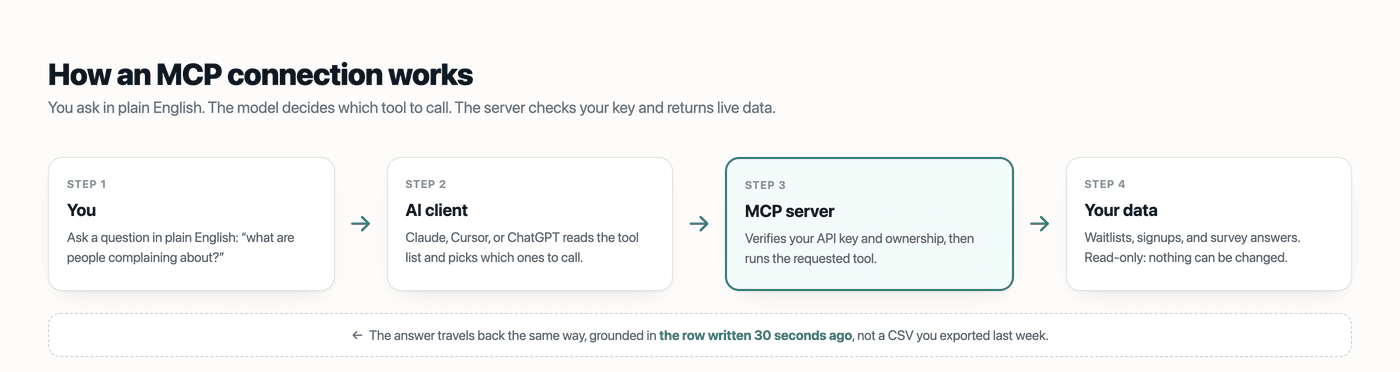
The part worth internalising is step 2. You do not tell the model which tool to use, and you do not chain the calls yourself. The server publishes a list of what it can do, with a description of each item, and the model reads those descriptions and decides. Ask a vague question and it will often call three tools in sequence to assemble an answer.
This is also why nothing breaks when a service adds a new capability. The client refetches the tool list on every session, so new tools simply appear. There is no version to bump on your side.
Tools, resources, and prompts
An MCP server can expose three kinds of thing. Most servers you meet use the first one heavily and the others sparingly.
- Tools are actions the model can invoke: query a database, search files, call an API. This is the workhorse. When someone says “an MCP server with three tools”, they mean three things the model can call.
- Resources are data the model can read directly, more like files than function calls. A document, a record, a log.
- Prompts are prewritten templates the server offers for common workflows, so a user can pick a known-good starting point instead of composing one.
The distinction matters mostly when you are building a server. As a user, you will experience nearly all of it as tools.
MCP vs an API vs a CSV export
These overlap, and the honest answer is that they are for different jobs rather than one replacing the others.
| Use | Best for | Falls down when |
|---|---|---|
| CSV export | A one-off look, or handing data to someone else | The moment the data changes |
| REST API | Code you write, features you ship | You just wanted to ask a question |
| MCP | Asking questions in your own words, repeatedly | You need deterministic, repeatable output |
That last row is a real limitation and worth stating plainly. A model deciding which tools to call is not deterministic. For a monthly report that must be identical every time, write code against the API. For “what changed this week and does it matter”, MCP is better than anything else available.
Four things people get wrong
1. That it uploads your data somewhere
It does not sync, mirror, or ingest. A tool runs when the model calls it, and only what that call returns reaches the conversation. No background transfer happens while you are not looking.
2. That MCP servers can do anything
A server can only do what its tools allow. If it exposes three read-only tools, that is the entire surface. This is why “what tools does it expose?” is the only security question that really matters, and a good server answers it in its docs.
3. That it is an Anthropic-only thing
Anthropic created it and open-sourced it. Support now spans Claude, ChatGPT, Cursor, VS Code, Zed, and a long tail of open-source clients. A server you connect today is not locked to one vendor.
4. That you need to be a developer
Building a server, yes. Using one, no. Connecting is pasting a few lines into a config file, and most hosted servers give you that block to copy.
When it is worth your time
MCP pays off when the data is messy, text-heavy, and you have open-ended questions about it. That is precisely where spreadsheets are worst and language models are strongest.
A waitlist is a clean example. Two hundred emails, each with a survey answer about what the person uses today and what they would pay. “How many signups?” is a spreadsheet question. “What are the three complaints that keep coming up, in their own words?” is not, and it is the one that changes what you build.
It is not worth it for a dashboard number you check daily, or for anything needing byte-identical output. Use the API for those.
Lighthouse ships an MCP server on Pro for exactly the waitlist case, with five read-only tools. If you want the setup rather than the concept, the walkthrough is in connect your waitlist to Claude with MCP.
Frequently asked questions
What does MCP stand for?
Model Context Protocol. It is an open standard for connecting AI applications to external systems, created by Anthropic and now supported across most major AI clients.
Is MCP free?
The protocol is open and free. Individual servers set their own terms: some are free and open source, some sit behind a paid plan because the underlying service does.
Which apps support MCP?
Claude Desktop and Claude Code, ChatGPT, Cursor, VS Code, Zed, and a growing set of open-source clients. The list has grown fast enough that it is worth checking your own app rather than trusting any article's snapshot, including this one.
Is it safe to connect my data?
It depends entirely on the server, which is the honest answer. Check two things: what tools it exposes, and whether any of them can write. A read-only server can return the wrong answer, which you can check. A write-capable one can take an action you did not intend, which you cannot undo.
Do I need MCP if I already have an API?
Not necessarily. They serve different users: the API serves code you write, MCP serves the model you talk to. Plenty of services offer both, and most people end up using whichever matches the question in front of them.