Ask Claude What Your Users Are Complaining About
Product feedback piles up faster than anyone reads it. How to point Claude, Cursor, or ChatGPT at your feedback board over MCP, find one specific report in seconds, and pull the themes out of hundreds of submissions.
Posted by
 Rouzbeh
Related reading
Giving a Support Chatbot Tools, Not Just Documents
A bot that answers from your docs is a weekend. A bot that can read and change a customer's own account is a different problem, and almost none of it is the AI part.
Answering Support When You Are the Whole Company
Support is the highest-quality research channel a small product has, and the fastest way to burn out if you treat it as an obligation. How to answer, what to automate, and how to say no.
The Pricing Page: What to Put On It, and What to Leave Off
Picking the number is one problem, presenting it is another. Plan names, the free tier decision, trials and card-up-front, annual billing, and the things founders add that quietly cost them customers.
Feedback has a specific failure mode. It arrives one item at a time, you read each one as it lands, and you never once read all of it together. Six months in you have four hundred submissions and a vague feeling that people find onboarding confusing, which is not the same as knowing.
The reason nobody reads it in bulk is that the useful question is not answerable by scrolling. “How many submissions this month” is a dashboard number. “What are the three things people keep bringing up, in their own words” requires reading everything and holding it in your head at once.
That is a reading job, and it is exactly what a model is better at than you are.
Table of contents
What changes when the AI can read it
Connect your feedback board over MCP and the question you ask changes shape. You stop asking for counts and start asking for meaning.
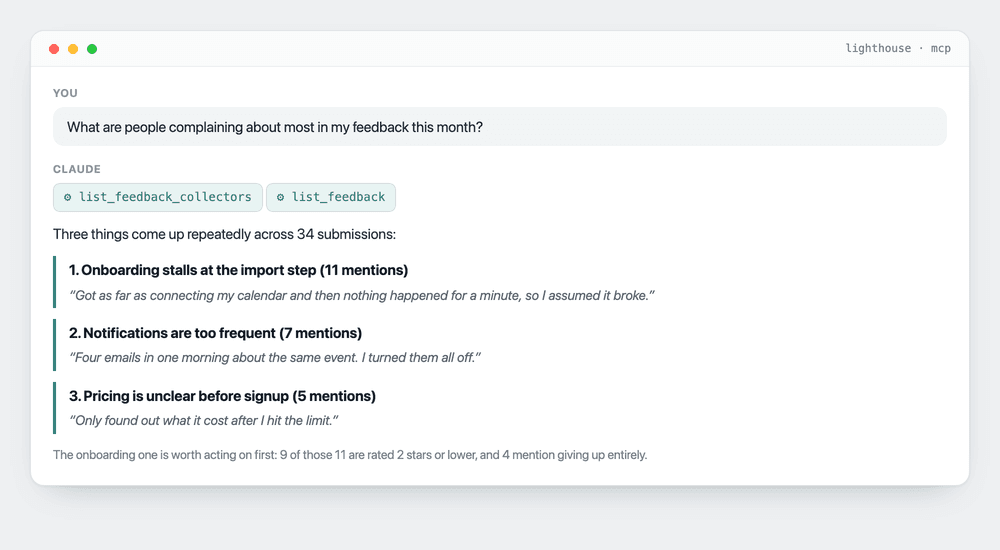
The part worth noticing is the last line. Counting mentions is useful, but ranking by severity is the thing you actually needed: eleven mentions where nine are two stars or lower is a different problem from eleven mentions where everyone still rated you four.
You could have worked that out yourself. You would not have, because it means opening four hundred rows on a Tuesday.
Finding one specific report
The other half is retrieval. Somebody mentioned a bug three weeks ago, you half remember it, and you have no idea which of four hundred rows it was.
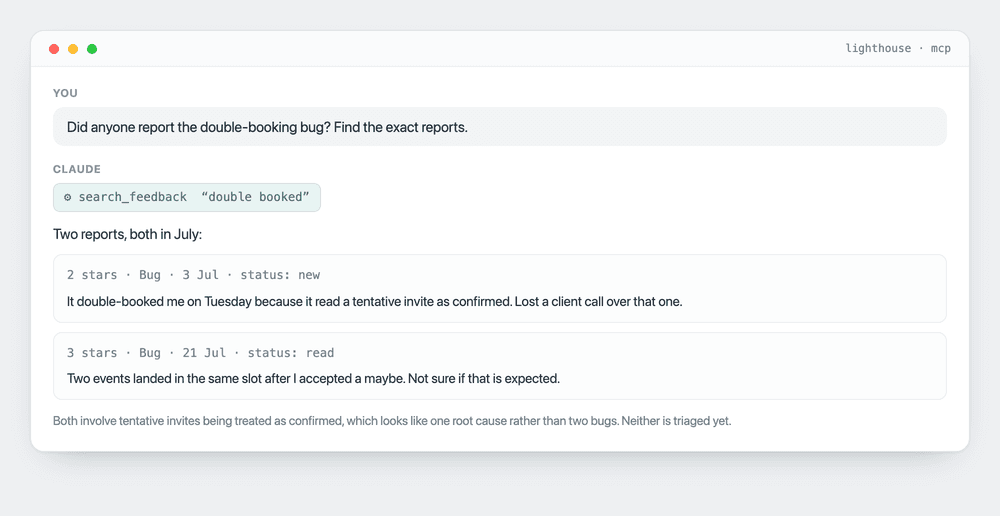
Two things happened there that a search box would not have done. It searched for the phrase you used rather than the phrase the users used, and it noticed the two reports share a root cause instead of listing them as separate bugs.
The four feedback tools
Lighthouse exposes these over MCP, alongside three for waitlists. All read-only.
- list_feedback_collectors returns every feedback board on the account with its categories, rating mode, and submission count.
- get_feedback_collector returns one board in full, with a breakdown of how many submissions are new, read, triaged, and shipped. This is the one that answers “how much have I not looked at”.
- list_feedback returns submissions newest first, filterable by status and category. Good for working a queue.
- search_feedback is RAG over the board. It retrieves the submissions closest in meaning to a query and hands those to the model to answer from, so “people who struggled to get started” finds someone who wrote “gave up halfway through setup”. This is the one you will use most.
You never call these yourself. The model reads the descriptions, picks, and chains them. Ask a vague question and it will typically call three in sequence to assemble an answer.
Prompts that earn their keep
- “What is in my feedback that I have not triaged yet, and which should I look at first?” Sorting an untouched queue by severity rather than by date is the single highest-value thing here.
- “Group everything from the last 90 days by theme. Quote one real submission per theme.” The quotes are the output. They are your changelog copy, your landing page objections, and your roadmap justification, already written by users.
- “Is anyone reporting something that sounds like the same underlying bug?” Duplicate detection across paraphrase, which keyword search cannot do and you will not do by hand.
- “Which feedback came from people who also left a low rating?” Filters the noise down to the people actually at risk of leaving.
- “Draft a reply to the three most recent bug reports, in my voice, without promising a date.” The model drafts, you edit and send. The no-promises clause matters more than it looks.
Why read-only matters more here
Every one of these tools is read-only, and with feedback that constraint is doing more work than it does elsewhere.
A feedback board holds two things you really do not want an agent acting on unsupervised: the email addresses of people who trusted you enough to complain, and a status field attached to a “we shipped it” notification. A write-capable integration that misreads an instruction can mark forty items shipped and email forty people about features that do not exist.
The model can read every submission and draft any reply you want. It cannot change a status, delete a report, or send anything, because those tools do not exist for it to call. The wrong answer is recoverable; the wrong email is not.
What it is bad at
Retrieval returns the closest matches, not all of them, and that distinction matters more than it sounds. Ask “how many people mentioned pricing” against search and you get a count of what it retrieved, which is a sample rather than an answer. Counting questions belong to list_feedback, which returns every row. The tool descriptions tell the model this, and it mostly listens, but it is worth knowing when you read a number back.
There is also a small lag on brand-new submissions. Feedback is searchable by meaning once it has been embedded, and embedding happens in batches rather than on write, so something submitted sixty seconds ago may not surface yet. That is a deliberate trade: putting an embedding call in the public feedback form would add latency and a third-party failure to the one path that has to stay up.
It is also not deterministic. Ask the same question twice and you may get the themes in a different order, or four instead of three. For a monthly report that has to look identical every time, use the REST API and write the query yourself. For “what is going on in here”, this is better than anything else available.
And it will not tell you what to build. It tells you what people said, ranked and grouped, faster than you could read it. The judgement is still yours.
Frequently asked questions
How do I set this up?
One line of config in Claude Desktop, Cursor, or any MCP-aware client, authenticated with your Pro API key. The full walkthrough is in the MCP setup guide, and there is a longer piece on connecting your waitlist the same way.
Does it work with a lot of feedback?
Yes, and that is when it starts mattering. At thirty submissions you can read them yourself. At four hundred you cannot, and search stops being a convenience and starts being the only way you will ever see the whole board.
Can it see my users' email addresses?
Yes, submissions include the email when one was given, so treat the connection as you would any other access to customer data. Revoking the API key in your dashboard cuts it off immediately, and it is worth using a separate key for anything experimental.
What if I use another feedback tool?
Then check whether it ships an MCP server. The pattern in this post is not Lighthouse-specific, it is what MCP is for. If your tool has no MCP server and no API, that is worth weighing at renewal.
Is this on the free plan?
No, MCP is on Pro at $29 a month, which also covers AI insights, the REST API, and custom domains. You can start a waitlist free and upgrade when you have enough feedback for this to matter.